
Edit Logo

Alex & Taylor's Wedding

foreverlove2026 🥂

Join us as we tie the knot and celebrate our love story! 🌟 We can't wait to share this magical day filled with joy, laughter, and wonderful memories with all our favorite people. 🤵👰💒🥂
Little Heartbeat Baby Shower See what's included
$5.33 €4.75 ₹499 £3.96

Your invite is ready

One payment. Live instantly. Share with everyone.

About

Reviews

No reviews yet

Hosts who use this design can leave one after their event.

Little Heartbeat

Baby Shower
Price
$ 5 .33
One-time Published instantly · No subscription
€ 4 .75
One-time Published instantly · No subscription
₹ 499
One-time Published instantly · No subscription
£ 3 .96
One-time Published instantly · No subscription
Ask any parent-to-be about the first scan and they'll tell you about the sound. The room goes quiet, the screen flickers, and then there it is: a fast, galloping whoosh-whoosh-whoosh, much quicker than you expected. Someone squeezes a hand. Someone cries. Somebody else takes a shaky video on their phone that they'll watch forty times that night.

A baby's heartbeat really is fast. It usually beats somewhere around 110 to 160 times a minute, roughly twice the speed of an adult's. Doctors listen for it with a Doppler from about the end of the first trimester. For most families it's the moment a pregnancy stops being news and starts feeling like a person.

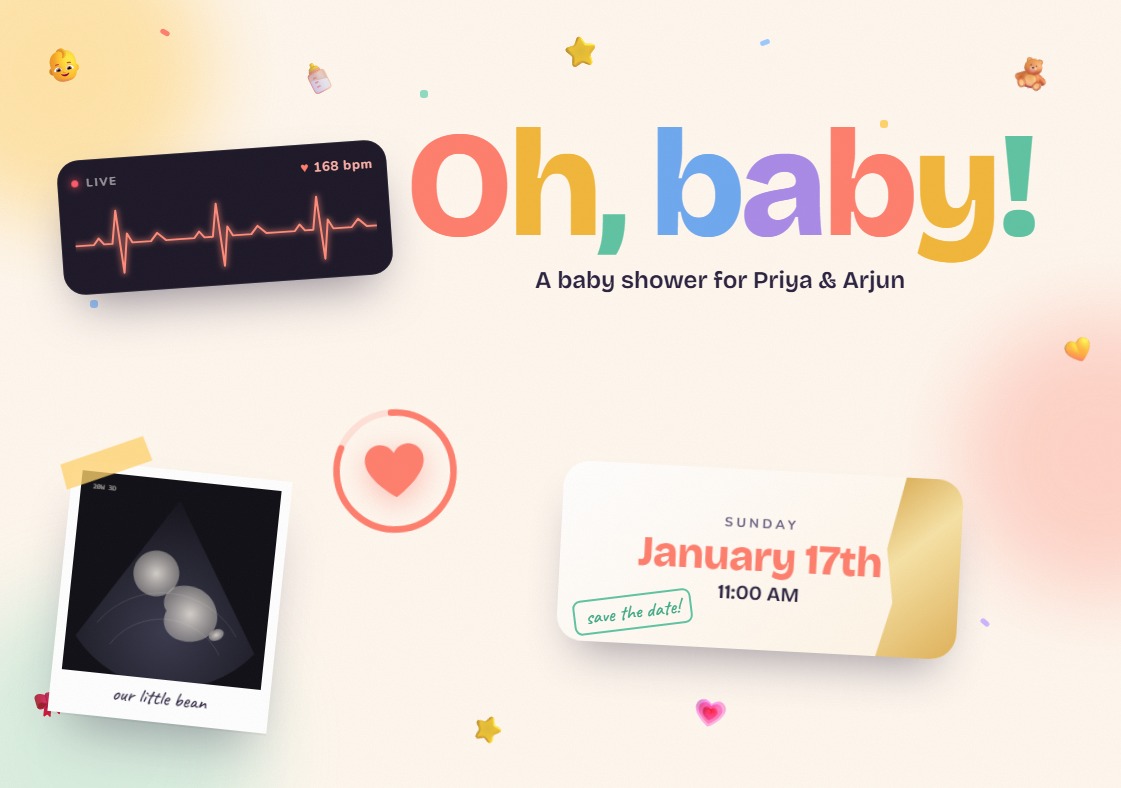
The Little Heartbeat digital baby shower invitation starts right there. Your guests open it to a small dark monitor with a glowing coral heartbeat line and a little "LIVE" light blinking. Underneath sits a big soft heart: press and hold. As they hold it, they hear the heartbeat thump, the number climbs from 142 to over 200 bpm, the ring around the heart fills, and then it bursts. Confetti, tiny baby bottles, teddies and stars fly across the screen, and the words "We're having a baby!" bounce into place letter by letter.

After that it's pure joy. "Oh, baby!" stands huge in rainbow letters that wobble gently, as if they can't keep still either. A taped polaroid holds your bump photo or scan with a handwritten caption. The date hides under a gold scratch card: guests scratch it with a finger, and when it's revealed there's another burst of confetti and a little "save the date!" stamp. Tiny footprints walk across the screen toward your venue. At the end there's a heart button that sends love: every tap floats hearts and baby emojis up the screen and counts the hugs sent.

It's made for the people who'll love this baby before they've even met them. Send it to the family group and someone will hold that heart three times just to hear it again. Someone else will scratch the card before reading anything. Grandma will press the love button 47 times.

It works for a classic baby shower, a sprinkle, a godh bharai or a seemantham, and it never assumes boy or girl.

What the invite does

The Little Heartbeat digital baby shower invitation opens from one link on any phone, made for WhatsApp, text and email.

  • A reveal guests feel. Press and hold the heart to hear the heartbeat speed up until it bursts into your announcement. There's a "tap to open" link too.
  • Your photo. Add a bump picture or scan to the polaroid, with your own caption.
  • Scratch to reveal the date, with a tap-to-reveal option for anyone who prefers it.
  • Send love. Guests tap to float hearts up the screen.
  • RSVP, map and registry. Replies in a tap, the venue in maps, and a gifts note you can switch off.
  • Sound that follows your mute button. The heartbeat, joy and pop sounds play only after a tap, and the site's own mute button controls them.
Share Invitation
Edit Text

Sign in to continue

Your customizations are saved — sign in to proceed.

Sign in

Little Heartbeat Baby Shower · Changes show as you type
Customize

Details

Add a custom hashtag to your event invite.

Names

Update the names for the invitation

❤️
💕

Event Date & Time

Set the date and time for your event


Edit Text

Customise text fields in the theme

Venue & Map

Venue name, address and map location

Photos & Videos

Upload images and videos for your invitation

Up to 50 guests can RSVP free.

RSVP Form Fields

Choose which fields to include in the RSVP form

Personalized Message

Message shown to guests on the RSVP form

Custom Form Fields

Add custom questions to the RSVP form


Contact info will be displayed on the event page. So users can get in touch with the host.

Preview

Event Details

Update the event details for the invitation

Background Music

Add background music to your invitation

Share Cover Image

Add a cover image to your invitation

Custom Branding / Logo

Add your own logo or branding to the invitation

Gift Registry

Add a gift registry for your guests

Event Schedule

Show a timeline of events for your guests

Thank You Page

Customise the thank you message for your guests


Google Maps, Apple Maps links and more are supported
In Google Maps → Share → Embed a map → copy the code and paste it here.
Map preview will appear here
If enabled, the venue location will be hidden on the invitation

Google Maps, Apple Maps links and more are supported
In Google Maps → Share → Embed a map → copy the code and paste it here.
Map preview will appear here
If enabled, the venue location will be hidden on the invitation

TEMPLATE DEFAULT

This is the template's default music. Upload your own below to replace it.

Background music

Music will play automatically when guests open your invitation. Supported formats: MP3, WAV, OGG (max 10 MB).

Preview
Overrides the title shown when this link is shared on WhatsApp, iMessage, etc.
Overrides the description shown in link previews.

Click to upload logo

Custom branding

Your logo will appear on the invitation. Use a PNG or SVG with a transparent background for the best result.


Start your wishlist ✨

Add items you'd love — guests can pick directly from your registry


Plan your timeline 🗓️

Map out each moment so guests know exactly what to expect


Thank you page will be displayed to guests after event day.

Invite Validity

Set the period your invitation is accessible

Guests can view your invitation between these dates, for up to 5 months from the day it goes live

Password Protection

Restrict access to your invitation with a password

Guests must enter this password to open the invitation.

Open Mode

Choose how the invite opens for guests by default

Choose how the invite opens by default when guests view it

Drag & drop files here

or browse

Image Video Audio

Max 10 MB per file

Your files are saved here and will be uploaded to your invitation after payment is confirmed.